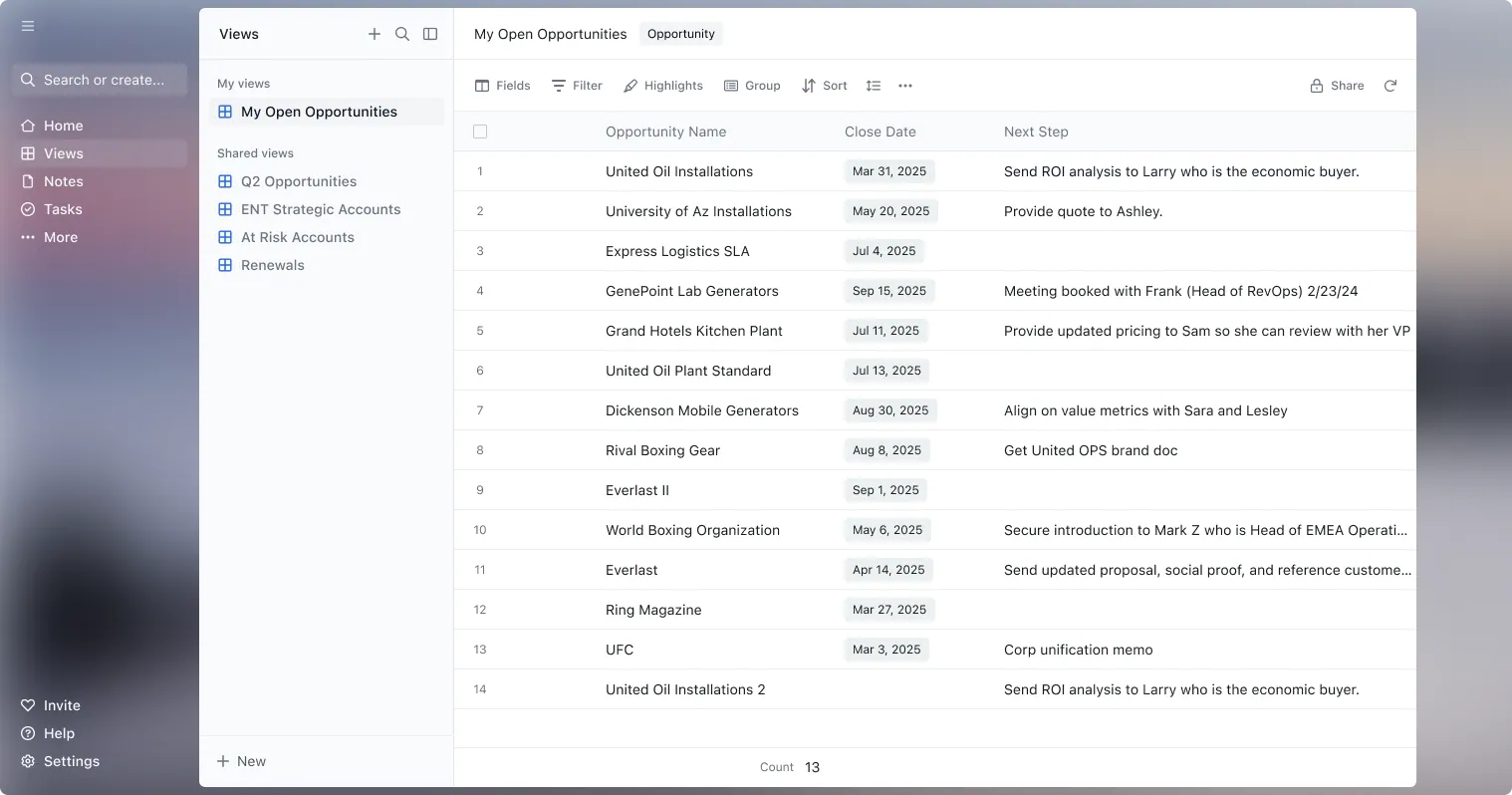
Work pipeline like a spreadsheet
Stages, next steps, close dates, forecasts. Edit them in a sheet that writes straight to Salesforce. Updates take seconds, so they actually happen.

Scratchpad is the fastest, easiest way to work with your Salesforce data.
 4.8/5 from 1,490+ reviews on














A beautifully simple experience built on top of Salesforce. Reps update deals and get back to selling. Leaders see what changed without nagging reps.
Work pipeline like a spreadsheet
Stages, next steps, close dates, forecasts. Edit them in a sheet that writes straight to Salesforce. Updates take seconds, so they actually happen.
See what changed on every deal
Open a deal and get the full picture: what moved, what's missing, what's stuck.
Update records in bulk
Missing next steps, stale close dates, empty fields. Clean them up in bulk from one view. Same view for reps, managers, and RevOps.
Capture sales notes and save to Salesforce
Intuitive, free-form sales notes for human work that save to the right opportunity in Salesforce.
A great interface transforms how you work. Every keystroke counts
and we sweat the details to create products humans enjoy using.
Lightning was the future of Salesforce ten years ago
The interface has barely changed since.
Headless isn't always the answer
Pipeline reviews and forecasting don't fit in an AI chat box.
Building your own is a headache
Spreadsheets and custom pages are one more thing to maintain.

“I built the Lightning UI. I worked really hard on it. Why should you ever log into Salesforce again? Maybe you never will.”
“I found that Salesforce Lightning is actually very slow, and it seems that using Scratchpad is actually a much faster process. It's also a lot easier to customize and modify my reports, due to Scratchpad's interface just being so much more user-friendly.”
 Caleb BoumaClient Success Manager, Emsi Burning Glass · TrustRadius
“Their UI makes it easy to make mass edits and changes to SFDC fields without the extra clicks that Salesforce makes you go through.”
 Raymond LinAccount Executive, Mixpanel
“It's a quick way to surface Salesforce data and edit almost all fields in line. I'm able to do all of this right in the Chrome browser without firing up Salesforce, and let's face it, the mass amounts of data take a while to load up and edit within the app itself.”
 Wesley MakAccount Executive, Twilio
“Managers now talk strategy instead of chasing data. Sellers move faster because they trust what's in Salesforce. Scratchpad became our single workspace for execution.”
 Manny FosterDirector of GTM Enablement, Fundraise Up
“We can make edits to Salesforce opportunities as if we were editing an Excel spreadsheet.”
 Justin GreenArea Sales Manager, Comexi
“The user experience and interface are clean and very straightforward for our sales team, especially since they don't have much Salesforce experience.”
 Maxwell MitchellSalesforce Operations Administrator, Livly
“CRM is no longer the system where sellers work. It's where data is stored. Sales execution is happening elsewhere and that's precisely where Scratchpad fits in as the layer where sellers actually work.”
 Feras AbdelSr. Director of RevOps, MaintainX
“Scratchpad helps us reinforce MEDDIC without audits, policing, or busywork.”
 Alex KeanDirector of Revenue Operations, Merge
“Best sales tool I've ever used. Scratchpad solves the chaos that is Salesforce. Spend less time navigating Salesforce and more time working your pipeline.”
 John GoodwinSales Manager, NP Accel
“It's no secret that Salesforce isn't the most user-friendly platform out there and Scratchpad has all the Opportunity fields I need to update in their platform.”
 Sean ZehnderCommercial Account Director, Ambition
“Scratchpad is just quicker and snappier than prospecting out of a Salesforce report… I take a lot of momentum out of that time when I have to click multiple links and wait for a page to load.”
 Tyler RemeisAccount Executive, 1build
“Scratchpad makes updating opps so easy, easy to view all opps, and I love the templates for notes as well. Overall one of my favorite tools to spend less time in Salesforce!”
 Chandler PearceMid-Market Account Executive, Ironclad
“Our data hygiene has seen a total 180 since we implemented Scratchpad… If I want people to have more confidence in their forecast number, then they're going to have to understand the information in Salesforce better and actually input that data into Salesforce. That's what we accomplished with Scratchpad.”
 Natalie BlardonySales Ops Manager, Crunchbase
Fundraise Up transformed seller productivity and improved CRM data quality with Scratchpad
A new RevOps team redesigned the GTM process and adopted Scratchpad to automate Salesforce updates, simplify seller workflows, and drive consistent MEDDIC adoption.
Read story →MaintainX improved CRM hygiene and MEDDPICC adoption by over 90%
Reps were stuck updating fields instead of moving deals forward, and the CRM no longer reflected the pipeline. See how MaintainX solved it.
Read story →How Merge drove MEDDIC consistency without forcing reps into Salesforce
Merge reinforced MEDDIC in the flow of work, reduced seller admin, and gave leaders confidence their pipeline reflected reality.
Read story →Sheets
Work deals in a fast, flexible sheet view with a live Salesforce connection.
Notes
Capture deal context that saves to the right Salesforce record.
HUD
A Chrome extension and one keyboard shortcut that bring Salesforce data to any website or web app.
Simple pricing to get up and running fast, and less than building and maintaining your own.
$20 a user / month (billed monthly)
$16 a user / month when billed annually, save 20%
Start with a 30-day free trial.
Every feature, for your whole team, for 30 days. Pay only when you are ready.
Everything included



Scratchpad connects to Salesforce instantly via API, inherits permissions, rules, and guardrails for a secure deployment. It's SOC 2 Type 2 compliant with continuous monitoring and aligned with GDPR and CCPA guidelines.
More security
Scratchpad consistently ranks as the G2 industry leader and high performer based on thousands of reviews from sales leaders, operations leaders, and sales teams.

 Summer 2026
 Summer 2026
 Summer 2026
 Summer 2026